
What you have to turn on
These platforms work differently from streaming stores: they recognise your recording when other people use it in their videos, and pay you for that use. Because of this, they’re a separate choice in the release builder.- In Review & submit, open the Content ID & social card.
- Choose Distribute to UGC.
- Tick I hold exclusive rights to this recording and every sample in it.
- Pick the platforms you want, and tick the extra YouTube confirmation if you picked YouTube Content ID.
- Click Save.
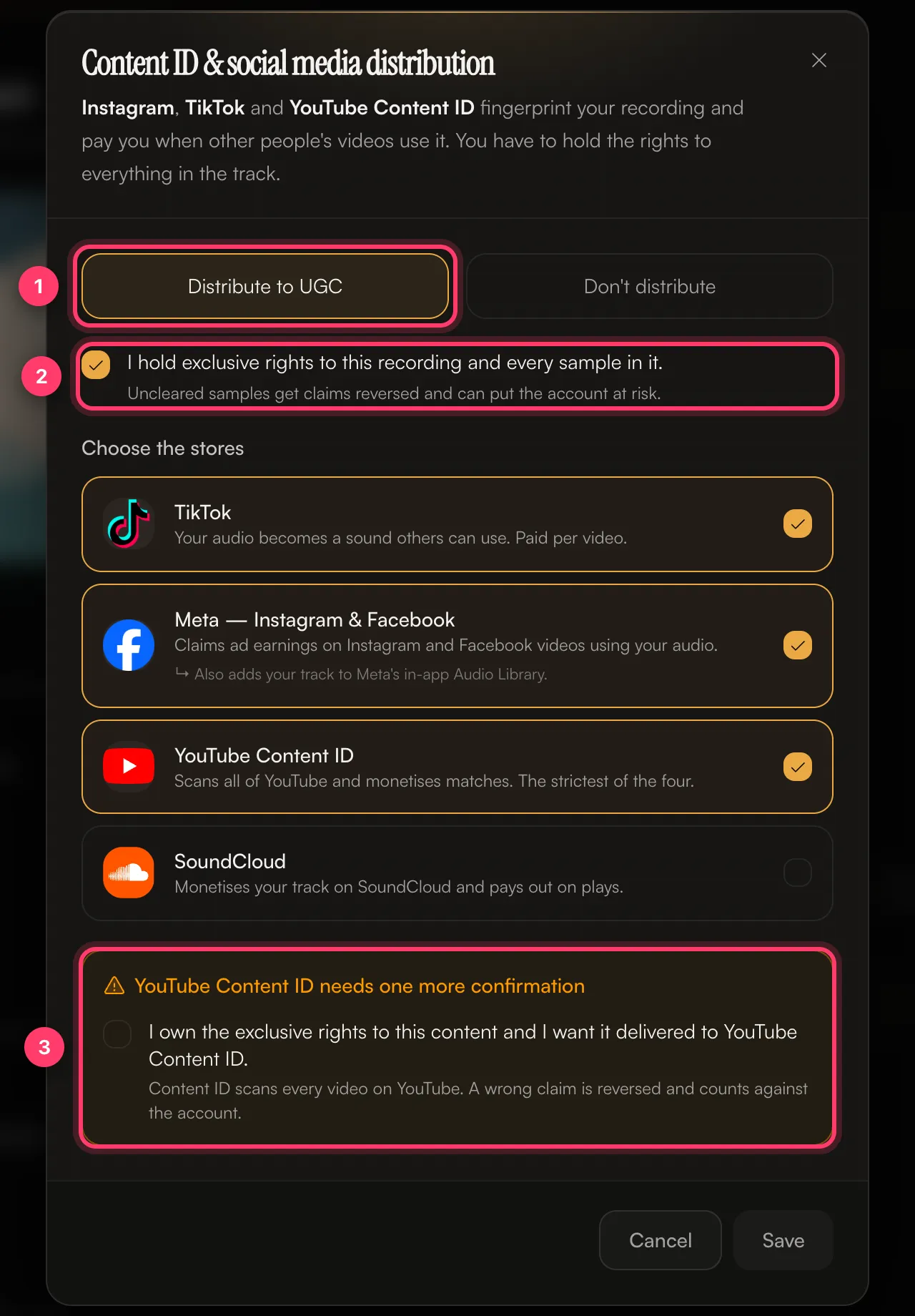 If you choose Don’t distribute, the release still goes to the streaming stores you picked, including YouTube Music. It isn’t sent to the platforms in the Content ID & social dialog.
See Content ID and social platforms for each option and when not to opt in.
What each platform does with your release
- TikTok: your audio becomes a sound others can use in their videos. Paid per video.
- Instagram and Facebook: your track is added to the in-app audio library, and ad earnings are claimed on videos that use your audio.
- YouTube Content ID: YouTube scans uploads for your recording and earns from videos that match. It’s the strictest of the options. A wrong claim is reversed and counts against the account.
- YouTube Music: a streaming store. It’s part of the main store list, not the Content ID choice.