
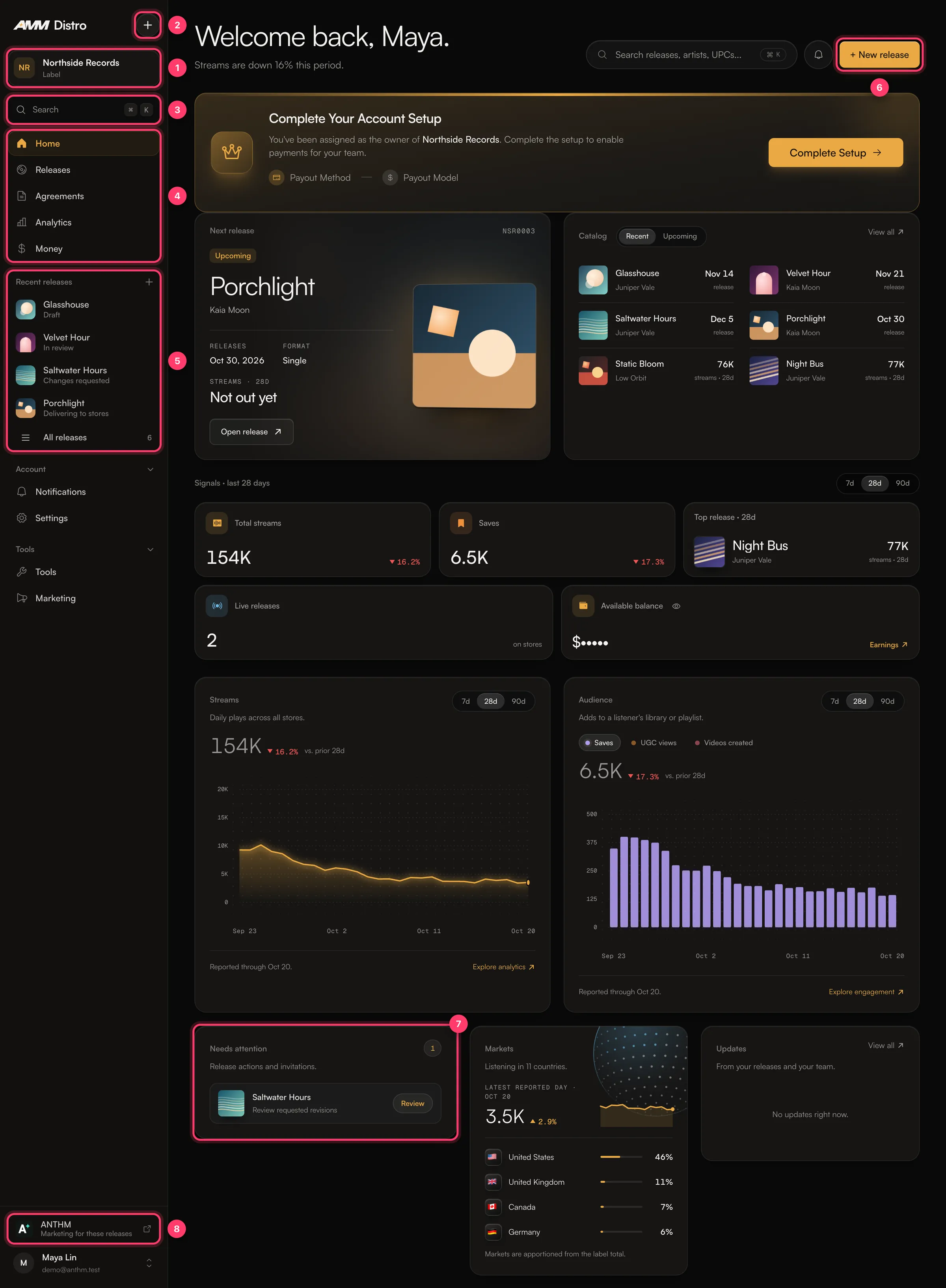
1. Account switcher
The card at the top of the left menu shows the account you’re working in, such as your artist name or your label. If you belong to more than one account (for example your own and a label’s), click the card and pick another account. Everything you see changes to that account.2. The + menu
Click + to start something new:- New release: a single, EP or album.
- Music video: upload a video for one of your songs. If it’s greyed out, music videos aren’t turned on for your account.
- Import a release: a release that’s already out elsewhere.
- Smart link: one link to your release on every store.
3. Search
Click Search or press ⌘K (Ctrl+K on Windows) to jump to any release, artist or page. You can search releases by title, artist, UPC or Release ID.4. Main menu
Below that, Account has Notifications, Settings and Help center, and Tools has Tools (including Catalog Transfer) and Marketing.
5. Recent releases
Your latest releases with a short line under each. Before a release is approved, the line is its status, such as “Draft”, “In review” or “Revision requested”. Once it’s approved, the line is its date, such as “Out Nov 14” or “Released Jun 19”. Click one to open it, or click Recent releases to see them all.6. ANTHM
Opens ANTHM, our marketing platform for creator campaigns. It uses the same sign-in. You don’t have to use it. Label accounts don’t show this link.Home
Above the cards are Search and the New button, which opens the same menu as +.- Balance: what you’ve earned. Click the eye icon to show or hide it, and View earnings to open Money.
- Streams: streams over the last 30 days with a small graph. Click Open analytics for more. Store data is a few days behind.
- Support: Open support chat to message our team, or Help center for guides.
- Latest releases: your three most recent releases. Click See all for the full list.
- Updates: things that need you or news about your releases, such as a release that needs changes or a signature, a split invitation, project files your label asked for, a copyright claim, or a playlist add. Click See all for everything.